VaudTax · Chapter 1/11
VaudTax: documents to gather, deadlines and how to log in
Key points
- Since the 2025 tax return, VaudTax is online only: there is no software to install, everything runs in your browser.
- To log in you need your taxpayer number (numéro de contribuable) and your control code (code de contrôle), printed on the A3 form you receive by post.
- The legal deadline is 15 March. If you live in Switzerland, the tax office accepts returns until 30 June without a request, and a free online extension (e-Délai) is available.
- VaudTax does not save automatically: save your .vaudtax file to your device regularly.
- VaudTax is in French only. This guide quotes the exact French labels so you can find them on screen.
VaudTax in 2026: online only
The Vaud cantonal tax administration (ACI) discontinued the downloadable VaudTax software from the 2025 tax return onwards. You now fill in your return in the VaudTax online service at vd.ch/vaudtax, available 24/7 with no installation. Recent browsers are supported (Chrome, Edge, Firefox, Safari).
You cannot open that file by double-clicking it: you re-import it into VaudTax online to continue. Next year, the same file lets you carry over last year's data.
Taxpayer number and control code
Early in the year you receive a large A3 envelope containing the « Formulaire de transmission de la déclaration d'impôt ». It shows your taxpayer number and your control code. Those are the only two things you need to open your return.
- Keep this form until the process is over: you also need it if you post supporting documents on paper.
- If VaudTax says the number and code do not match, check both against the A3 form (0 and O, 1 and I are easy to mix up).
- Just moved to Vaud and received nothing? New taxpayers first receive a form to set provisional instalments, then the tax return early the following year.
The login screen
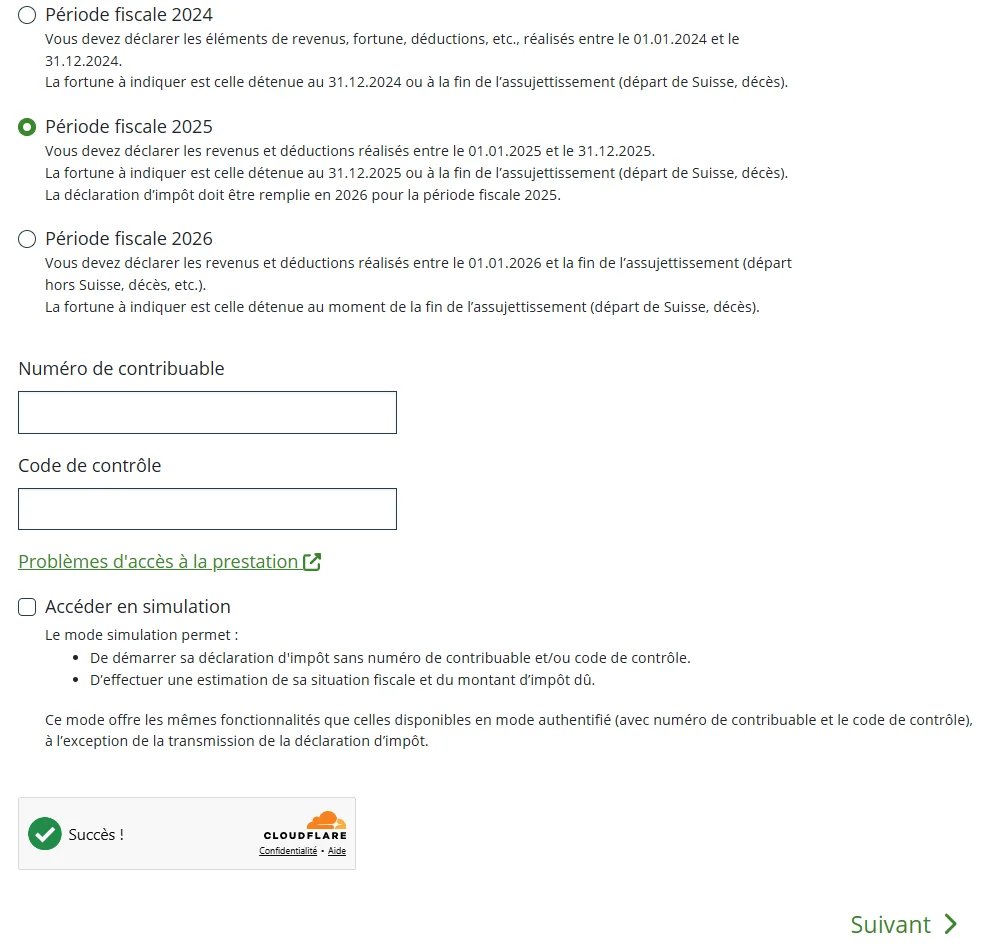
- 1Open vd.ch/vaudtax and click « Commencer » (start).
- 2Choose the tax period (« Période fiscale »): for the return filed in spring 2027, select « Période fiscale 2026 ».
- 3Enter your taxpayer number (« Numéro de contribuable ») and control code (« Code de contrôle »).
- 4Complete the anti-bot check (Cloudflare), then click « Suivant » (next).
Guided or independent mode?
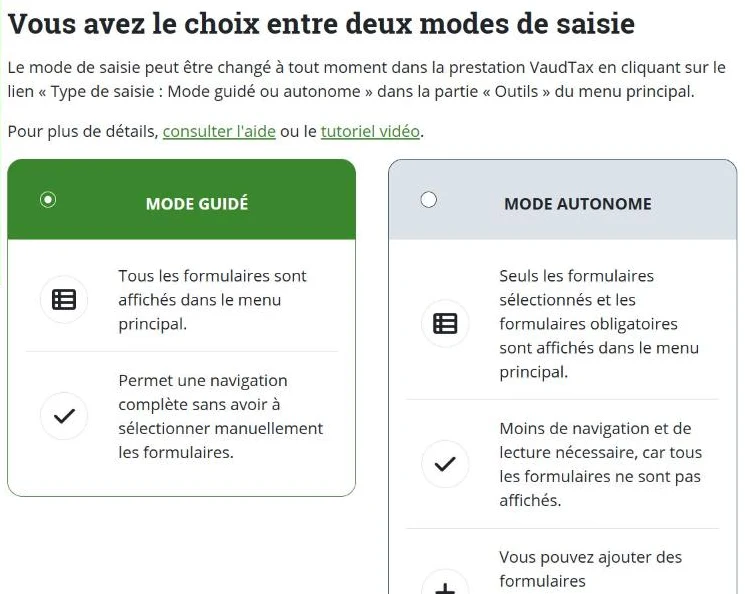
For a new return, VaudTax then lets you import last year's file or start from scratch, and choose an input mode. Guided mode (« Mode guidé ») shows every form in the menu: the safest way not to miss anything, and the one this guide follows. Independent mode (« Mode autonome ») only shows the forms you pick. You can switch at any time (« Outils » menu, « Type de saisie » link).
Documents to gather before you start
The slowest part of a tax return is hunting for paperwork. Gather everything before opening VaudTax. For the 2026 return, you need the documents for calendar year 2026 (income) and your situation on 31 December 2026 (wealth).
| Document | Where to find it | Must be attached? |
|---|---|---|
| Salary certificate(s) from every employer | Issued by your employer in January or February | Yes |
| eRelevé fiscal or account and securities statements at 31.12 | E-banking, tax documents section | Yes (tax statement / tax values of securities) |
| Pillar 3a contribution certificates | Bank or insurer, in January | Yes |
| Pension fund (LPP) buy-in certificate | Pension fund | Yes from CHF 10,000, optional below |
| Childcare invoices (nursery, day parent, after-school care) | Childcare provider | Yes |
| Health insurance premiums and subsidies received | Annual statement from your health insurer, subsidy decision | No, but the amount is mandatory |
| Unemployment, sickness, accident or military pay statements | Unemployment fund, insurer | No (keep them) |
| Pension statements (AVS/AHV, AI, LPP) | Compensation office, pension fund | No (keep them) |
| Mortgage interest and debt statements at 31.12 | Bank | No (keep them) |
| Unreimbursed medical bills, donation receipts | Your files | No (keep them) |
| Property maintenance invoices (if claiming actual costs) | Your files | No (keep them) |
Deadlines: 15 March, 30 June and extensions
| Date | What it means |
|---|---|
| 15 March 2027 | Legal deadline for the 2026 tax return (or the date printed on your form). |
| 31 March 2027 | Suggested date for a voluntary payment if your provisional instalments were too low (avoids interest). |
| 30 June 2027 | Tolerance deadline for Swiss residents: returns accepted without an extension request. Also the last day to request an extension. |
| 30 September 2027 | Maximum extension usually granted through e-Délai (free). |
Request an extension online at vd.ch/e-delai with your taxpayer number and control code. If you file nothing, the ACI sends a reminder (CHF 50 fee) and may then assess you ex officio with a fine.
Official help
- Inside VaudTax, the orange boxes explain each section (in French).
- VaudTax technical support: 021 316 10 40. Tax questions: 021 316 00 00 (call centre).
- The ACI general instructions explain every code of the return (in French).
Frequently asked questions
Can I still download the VaudTax software?
No. The ACI stopped producing the VaudTax software from the 2025 return onwards. Use the online service at vd.ch/vaudtax. Approved private software exists (Dr. Tax, Windfisc, KTax), but the ACI does not support it.
Is VaudTax available in English?
No, VaudTax is in French only. This guide gives the French label of each section with an English explanation, so you can follow along on screen.
Do I need to sign a return filed through VaudTax?
No. An electronically filed return does not need a signature. Keep the PDF receipt (quittance) as proof of filing.
I lost my control code. What should I do?
The code is on the A3 form you received by post. If you lost it, call the ACI call centre on 021 316 00 00 with your taxpayer number.
Rather hand it over?
NeoFidu prepares and files your Vaud tax return for you, including a check for missed deductions. Service in English available.
This guide is for information only and is not personalised advice. Amounts come from official publications of the Vaud cantonal tax administration (ACI). VaudTax itself is in French: we quote the French labels so you can find them on screen. If in doubt, the official ACI instructions prevail.