GeTax · Chapter 11/11
Checking and filing your GeTax return: documents, paperless filing and receipt
Key points
- Before filing, every screen must show a green tick (or a yellow question mark, which does not block). Review the summary (« Récapitulation ») and the estimated tax calculation.
- Attach your documents as PDF under « Gérer vos justificatifs » (manage supporting documents): 20 files and 100 MB at most. The salary certificate is always mandatory.
- With an e-démarches account and fully electronic documents, choose paperless filing (« zéro papier »): you instantly receive a time-stamped filing receipt.
- Without an account, upload the return and post the signed summary page (« page de synthèse »): the return is only filed when it arrives.
Checking the return
In the tree, each screen has an icon: orange exclamation mark (to complete), red (to correct), green tick (correct), yellow question mark (non-blocking warning, for example a taxpayer number that does not exactly match the name). The message appears at the bottom right. Then switch to form entry to review the return page by page, as on paper, or print a draft (menu « Fichier », « Imprimer mode brouillon »).
The summary and the tax calculation
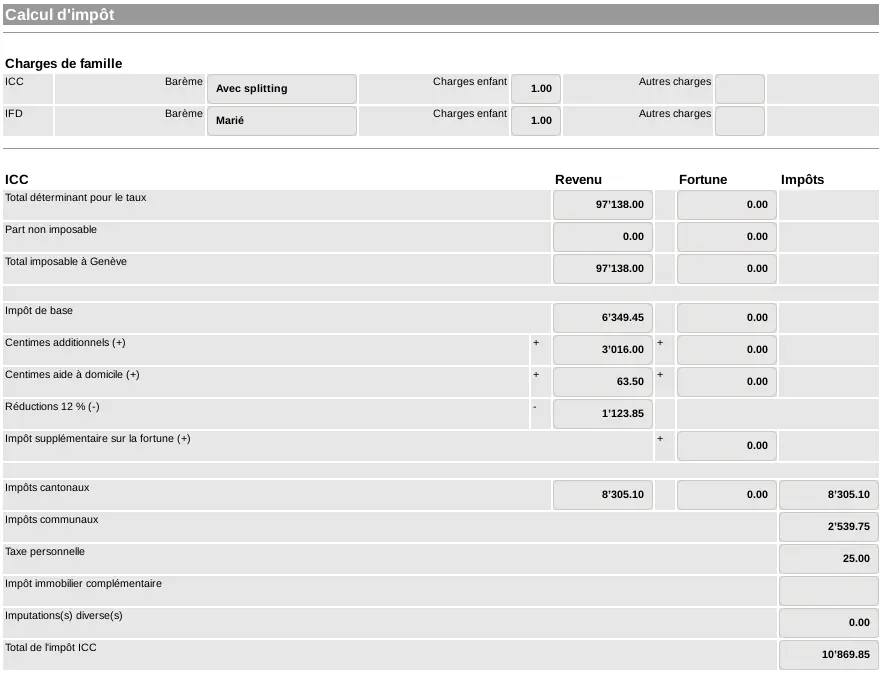
The summary shows declared income and wealth, deductions, the intercantonal and intercommunal allocation, then an estimate of cantonal and communal tax (ICC) and federal direct tax (IFD). It does not bind the AFC, but a surprising result often points to an entry error: net salary entered instead of gross, a federal amount forgotten, family allowances counted twice.
Finalisation: advance payments, documents, comments
- « Acomptes / Remboursements » (advance payments, refunds): state whether you pay next year's instalments online (one QR bill is then enough). Bank details for refunds are changed in your tax account (service « Mes Coordonnées Bancaires »), not in GeTax.
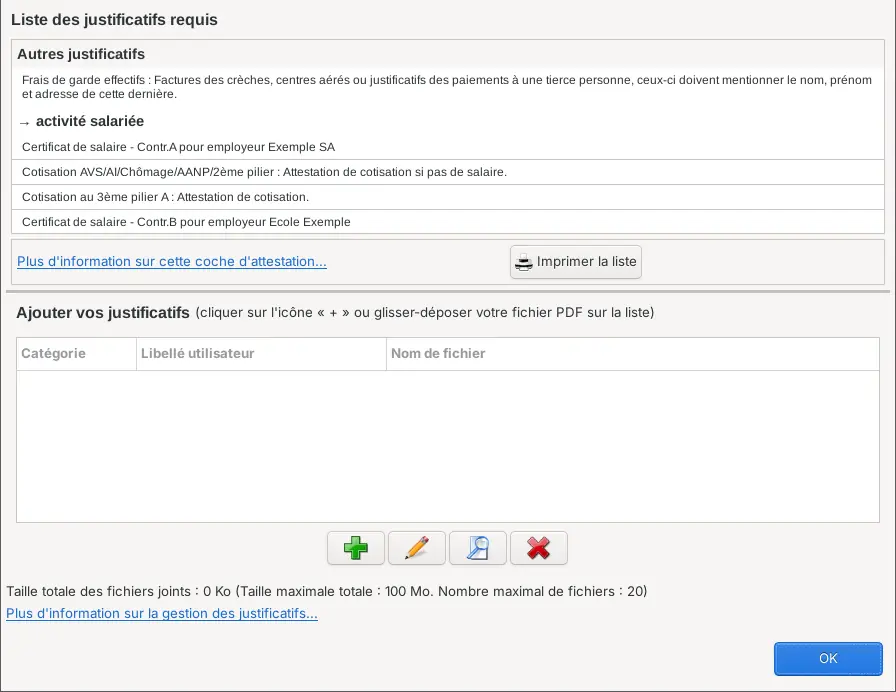
- « Gérer vos justificatifs »: GeTax first saves the return, then lists the required documents. Add the PDFs with the « + » button or by drag and drop: 20 files and 100 MB at most.
- « Observations » (comments): any useful note for the assessment (change of situation, paper schedule attached).
| Document | Send it? |
|---|---|
| Salary certificate | Always |
| Pillar 3a certificates, pension buy-ins | Yes |
| Childcare invoices | Yes |
| Pension certificates, interest and debt documents, divorce judgment | Only the first time or after a significant change |
| Year-end statements for salary or savings accounts | No, keep them |
| Receipts for medical costs, donations, property upkeep invoices | No, keep them |
| The return itself | No, the summary page is enough |
Filing: paperless or upload
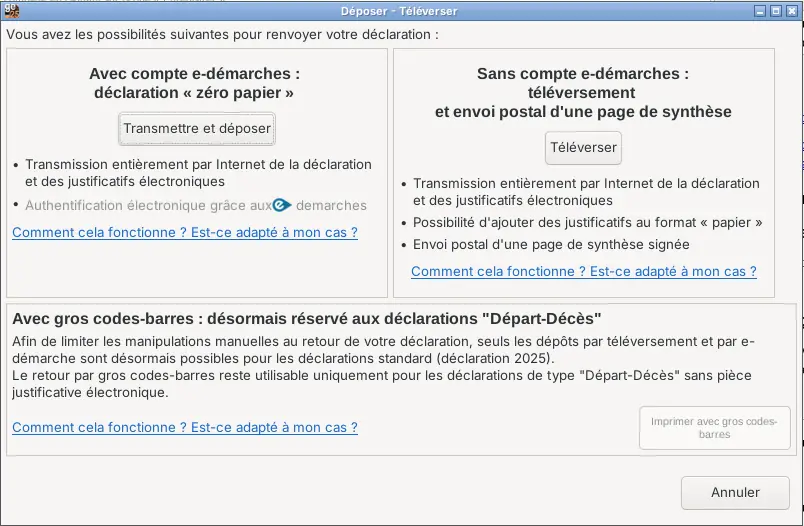
| Paperless (« Transmettre et déposer ») | Upload (« Téléverser ») | |
|---|---|---|
| Condition | e-démarches account and all documents as PDF | No account, or at least one paper document |
| Steps | e-démarches login, transmission of the return and documents | Transmission without login, then print and sign the summary page |
| Proof of filing | Filing receipt with time stamp and transaction number, first page of the saved PDF | AFC receives the signed summary page |
| Post | None | Signed summary page and paper documents |
| Visible in your tax account | Immediately | Once the page arrives, about 10 days at peak times |
Save the .tax file and the final PDF: you will import the data next year and can answer any AFC questions.
After filing
- A simple file takes 8 weeks on average. There is no point chasing the AFC within six months.
- You receive the cantonal and federal tax bills, the assessment notice and an account statement, by post or in your tax account (e-correspondence).
- Balance in your favour: refund within 30 days to the account on file. Balance due: 30 days to pay or object (« réclamation »). A payment extension can be requested.
- If you spot an error later, file an objection within 30 days of receiving the tax bill.
Frequently asked questions
How do I know my GeTax return has been filed?
With paperless filing, you get a time-stamped filing receipt with a transaction number, and the return appears in your e-démarches account. With an upload, it is only filed once the AFC receives the signed summary page.
Do I have to sign the GeTax return?
Not with paperless filing: the e-démarches login is enough. With an upload, you sign the summary page and post it.
How many documents can I attach in GeTax?
Up to 20 PDF files, 100 MB in total, under « Finalisation », « Gérer vos justificatifs ».
Can I still file the Geneva return on paper?
Printing with large barcodes is now reserved for departure or death returns. An ordinary return must be filed paperless, or uploaded with the summary page posted.
Rather hand it over?
NeoFidu prepares and files your Geneva tax return for you, including source tax and TOU cases, with a check for missed deductions. Service in English available.
This guide is for information only and is not personalised advice. Amounts come from official publications of the Geneva cantonal tax administration (AFC) and the Swiss Federal Tax Administration. GeTax offers an English interface, but the return itself is French: we quote the French labels, followed by a translation, so you can find them on screen. Screenshots show GeTax 2025 with fictitious data. If in doubt, the official AFC instructions prevail.