JuraTax · Chapter 1/11
Before you start JuraTax: online or desktop, Code-DI, SwissID, 2027 deadlines and extensions
Key points
- JuraTax comes in two free versions: JuraTax Online, in your browser with no installation, and the desktop program (« JuraTax Logiciel »), installed on Windows, macOS or Linux. Both are released each year around 27 or 28 January on jura.ch/guichet.
- The Code-DI (format 22Y-1Y6-YC5) is printed at the bottom right of page 1 of your return. It changes every year. A verified SwissID also lets you sign electronically and carry over last year's data.
- Deadline: end of February 2027. Extension to 31 October on the virtual counter or by form, charged CHF 31.
- A reminder costs CHF 42 (14 days), then a formal notice CHF 63 (10 days), then a fine of up to CHF 1,000 and an estimated assessment.
JuraTax Online or the desktop program?
| JuraTax Online | JuraTax desktop program | |
|---|---|---|
| Installation | None: a browser on a computer, tablet or smartphone | Program to download for Windows, macOS or Linux |
| Data storage | Automatic, on the canton's servers (Le Noirmont and Delémont) | On your computer, as a .tax file |
| Login | SwissID or Code-DI | Code-DI only: SwissID upload is no longer possible with the desktop program |
| Signature | Electronic with a verified SwissID; otherwise a summary page to sign | Summary page to sign and post, or a printed return with barcodes |
| Supporting documents | Online: PDF or a photo taken with your smartphone | By post only |
| Carrying over last year | With SwissID, if last year's return was uploaded | Import last year's .tax file |
The tax service recommends JuraTax Online, which allows a fully electronic return, supporting documents included. The desktop program remains useful if you prefer to keep your data on your computer or complete several returns offline. To sign with a SwissID you must use JuraTax Online, which imports the .tax files created with the desktop program: nothing is lost. It updates when opened, or via the « Outils » (tools) menu, « Mise à jour JuraTax » (update JuraTax), which also loads the securities price database. If your macOS or Linux version is too old, use JuraTax Online. There is no 2026 version before the end of January 2027: each version only works for its own tax period.
The Code-DI and SwissID
The Code-DI is your personal upload code, in the format 22Y-1Y6-YC5. It is printed at the bottom right of page 1 of the return and in the middle of the letter enclosed with your tax documents. It is valid for one year only. Lost it? Ask the secretariat of the individual taxpayers section (« Section des personnes physiques », 032 420 55 60, secr.pph@jura.ch): it is sent to you by post. Once your signed summary page is received, Code-DI access is deactivated: save a PDF copy of your return as soon as you upload it.
A SwissID is free and takes a few minutes to create, with an email address and a mobile number. Linked to your Code-DI in JuraTax Online, it unlocks every feature: carrying over last year's data, electronic signature (with a verified identity), tracking your assessment, requesting an extension and changing your instalments on the virtual counter.
Filing deadline and extensions
| Step | Rule |
|---|---|
| Ordinary deadline | End of February of the following year: 28 February 2026 for the 2025 return, end of February 2027 for the 2026 return |
| Extension | To 31 October, on the virtual counter with a SwissID or with the extension request form; charged CHF 31 on your assessment |
| Condition | No tax arrears from previous years |
| Representative | A fiduciary can request the extension on your behalf on the virtual counter |
| No request needed | For the 2025 return, no request was needed if you filed at the municipal office before 30 June 2026 or uploaded before 31 July 2026, free of charge |
Pay on time even if you request an extension: 28 February is also the general due date for the tax. If your instalments do not cover the estimated tax, pay the difference with the payment slip on form 110 (« Aide au calcul du solde d'impôt », tax balance calculator) to avoid compensatory interest from 1 March.
Documents to gather
- 2026 salary certificates from each employer, statements of unemployment, daily allowances (sickness, accident, disability) and loss-of-earnings (APG) payments.
- AHV, disability, pension fund and life annuity statements.
- Bank and postal statements at 31 December 2026, electronic tax statements (eRelevés fiscaux) as PDFs, securities and crypto statements, purchase and sale slips for securities.
- Pillar 3a certificates, pension fund buy-in certificate, surrender values of life insurance policies at 31 December.
- Your 2026 health insurance policy and, if you receive one, the ECAS premium reduction decision.
- Invoices for nursery, after-school care or childminder, unreimbursed medical bills and health insurer statements.
- For owners: official value, rents received, mortgage interest, final upkeep invoices paid in 2026.
- Your Code-DI, your taxpayer number and, for the desktop program, last year's .tax file.
Getting started: carry over last year or start from scratch
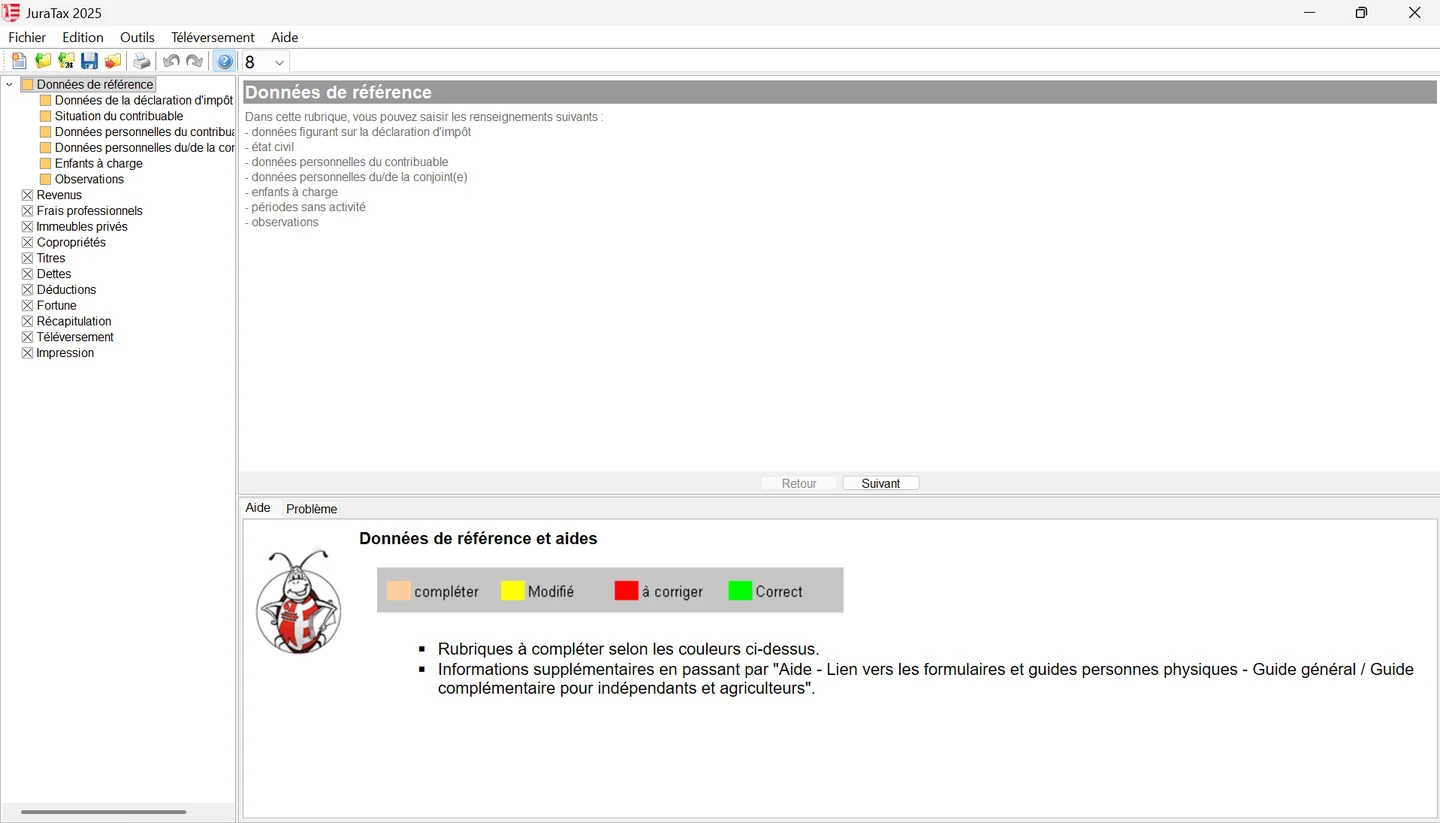
In the desktop program, choose « Fichier », « Nouveau » (file, new) for a first return, or « Fichier », « Importer... » (file, import) to carry over last year's data. The import only works if you saved last year's JuraTax file on your computer. You then fill in the return using the tree on the left: « Données de référence » (reference data), « Revenus » (income), « Frais professionnels » (work expenses), « Immeubles privés » (private property), « Copropriétés » (co-ownership), « Titres » (securities), « Dettes » (debts), « Déductions », « Fortune » (wealth), « Récapitulation » (summary), « Téléversement » (upload) and « Impression » (printing). The « Retour » (back) and « Suivant » (next) buttons move between screens.
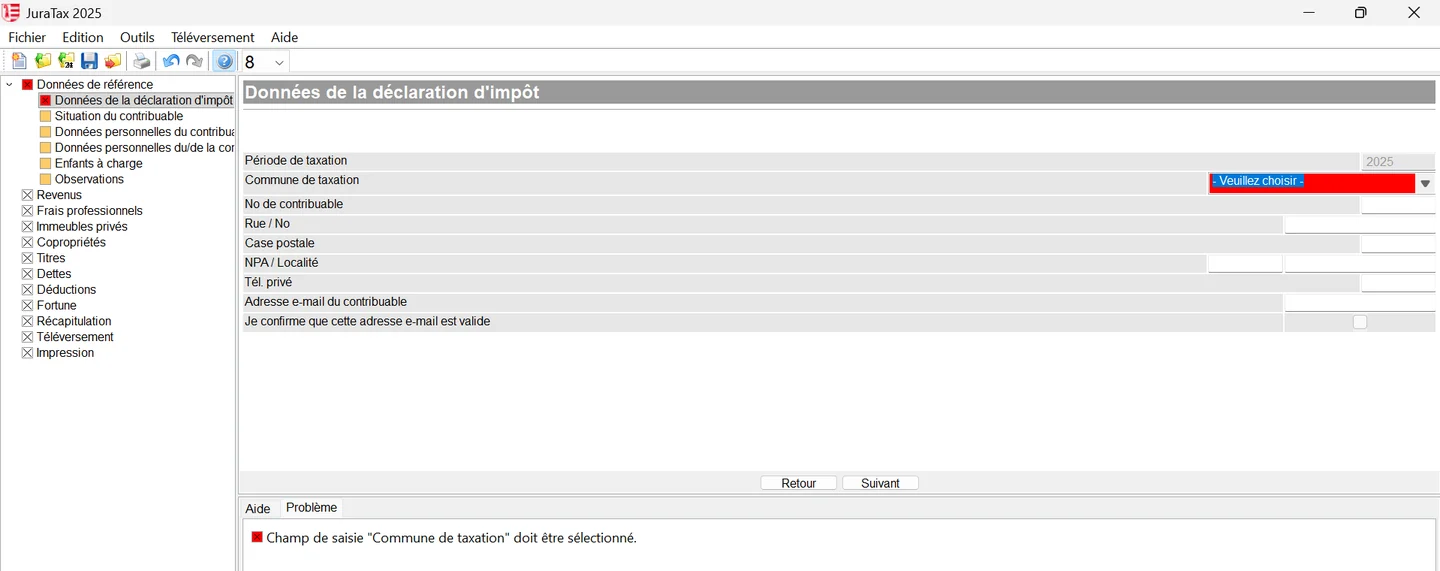
The first screen, « Données de la déclaration d'impôt » (return details), asks for the municipality of taxation, your taxpayer number (at the top of the paper return), your address, phone number and email address, which you confirm.
JuraTax Online has four main sections: « Commencer ici » (start here: import .tax files from last year or the current year, delete the return), « Parcourir la déclaration » (browse the return: every section), « Impression » (printing) and « Validation » (electronic or postal filing, list of supporting documents). To carry over last year's basic data (identity, employer, children, accounts), log in with your SwissID and click « Importer une déclaration d'impôt » (import a tax return). This only works if last year's return was uploaded, not sent on paper.
Moved into the canton or abroad during the year? You can use JuraTax, but the summary and tax shown are calculated on a full year: the tax service corrects them. The rest of this guide follows the order of the codes on the return, starting with your personal situation.
Frequently asked questions
Where can I download JuraTax 2026?
From the canton's virtual counter, jura.ch/guichet, under « JuraTax Logiciel », for Windows, macOS and Linux. JuraTax Online 2026 is launched from the same page. Both go online around 27 or 28 January 2027.
Where do I find the Code-DI?
At the bottom right of page 1 of your tax return, and in the middle of the letter enclosed with your tax documents. Its format is 22Y-1Y6-YC5 and it changes every year. If lost, the individual taxpayers section sends it again by post (032 420 55 60).
How much does a tax return extension cost in Jura?
CHF 31, charged on your assessment. The extension runs to 31 October and is requested on the virtual counter with a SwissID, by your representative, or with the extension request form.
Can I use JuraTax on a Mac or a tablet?
On a Mac, yes: the desktop program exists for macOS, and JuraTax Online works in Safari or another browser. On a tablet or smartphone, only JuraTax Online can be used.
Do I need a SwissID to use JuraTax Online?
No, the Code-DI is enough to fill in and upload. But without a SwissID you can neither carry over last year's data nor sign electronically: you then have to sign and post the summary page.
Rather hand it over?
NeoFidu prepares and files your Jura tax return for you, including property, undivided estates and subsequent ordinary assessment (TOU) cases, with a check for missed deductions. Service in English available.
This guide is for information only and is not personalised advice. Amounts come from the 2025 general guide (« Guide général ») of the Jura cantonal tax service (Service des contributions), its official forms and the Swiss Federal Tax Administration's Jura cantonal sheet (February 2026), which states that indexed amounts remain unchanged for the 2026 tax period. JuraTax is not available in English: we quote the French labels, followed by a translation, so you can find them on screen. Screenshots show JuraTax 2025 with fictitious data. If in doubt, the tax service's general guide prevails.