JuraTax · Chapter 11/11
Checking and filing your JuraTax return: upload, summary page, supporting documents and instalments
Key points
- In the « Validation » section, JuraTax offers electronic filing (upload, « téléversement ») or postal filing, and prints the list of supporting documents required.
- With a verified SwissID in JuraTax Online, the return is signed electronically. With the Code-DI, the summary page (« page de synthèse ») must be signed and posted: without it, the return is treated as not filed.
- Supporting documents are sent online (PDF or photo) with JuraTax Online, or by post to the tax service's scanning centre in Delémont with the desktop program.
- Spotted a mistake after uploading? You can no longer upload: send a letter or the corrected printed return to the tax service.
Check before filing
- Go through the preview: every code on the return must match your documents (salary from box 11, pillar 3a, premiums, values at 31 December).
- Compare with last year's assessment: a large difference on a code should have an explanation.
- Check accounts carried over from last year: delete closed accounts, add new ones.
- Check the refund IBAN and, for a couple, the amounts entered for each spouse (C codes).
- Look at the tax calculated by JuraTax: it is a benchmark to check your instalments. If you moved in or out during the year, it is calculated on a full year and will be corrected.
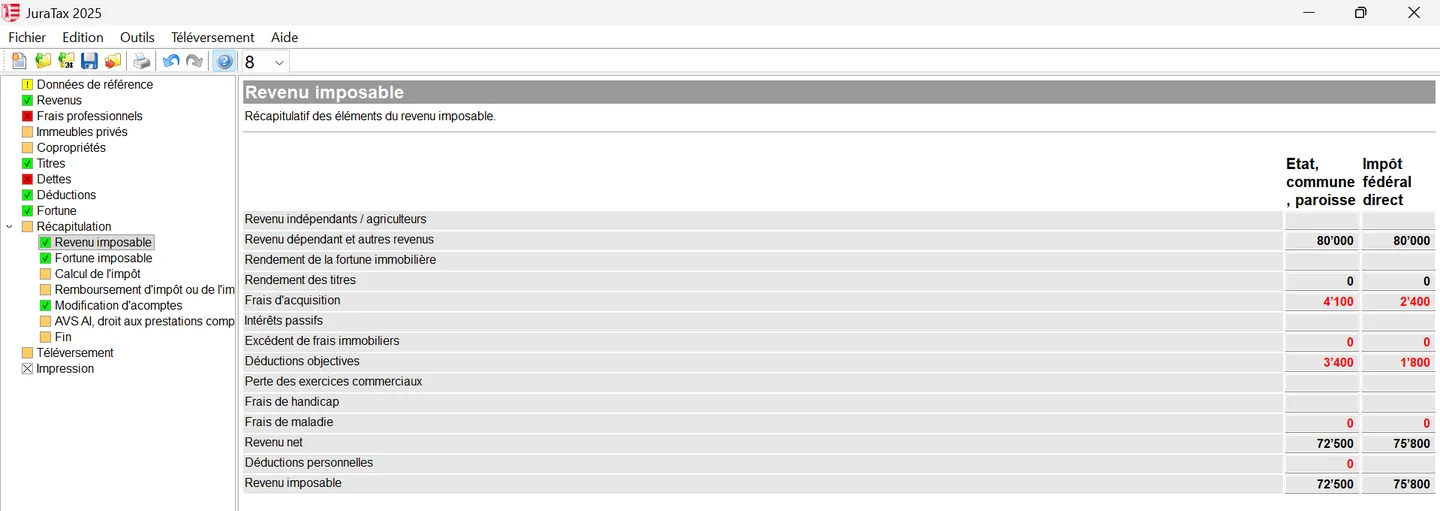
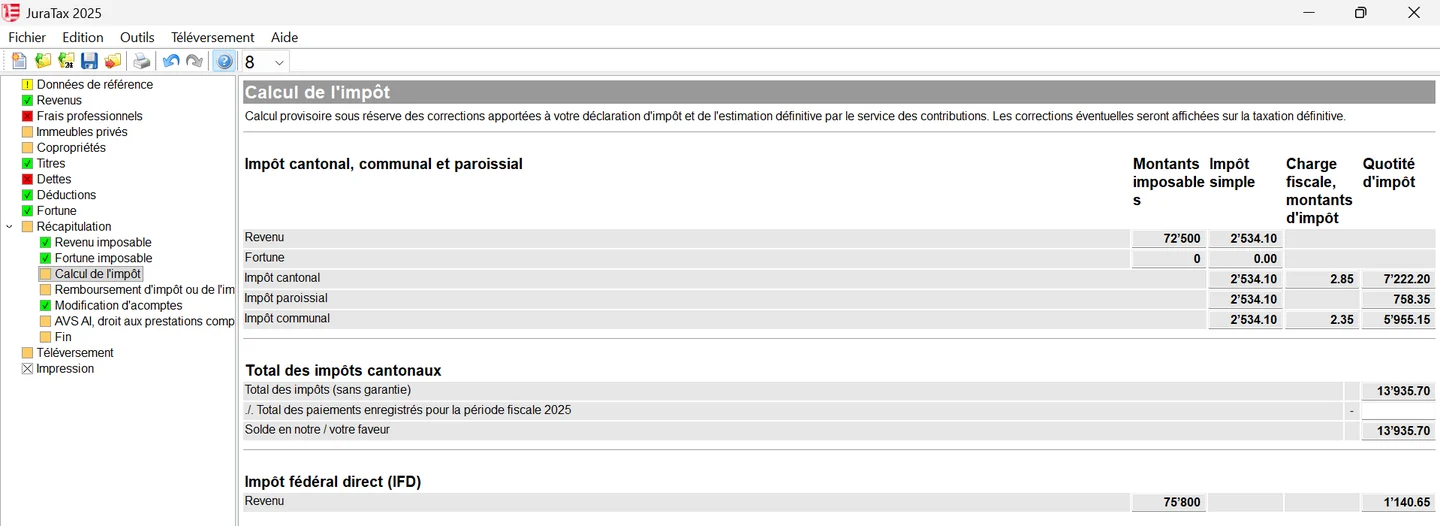
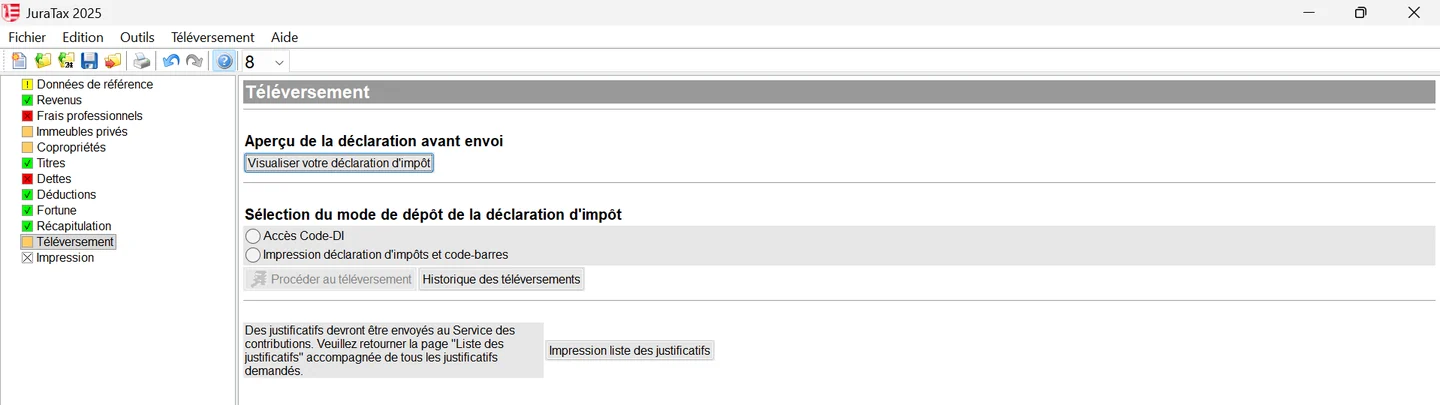
The four ways to file the return
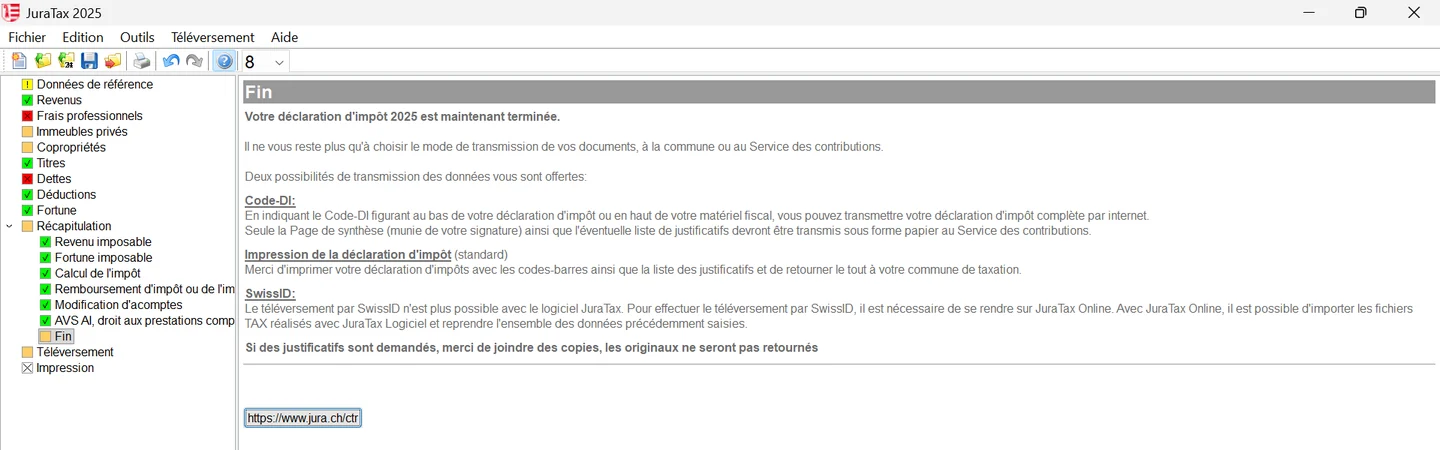
JuraTax's « Récapitulation » (summary) section also covers: investment in new innovative companies (code 915), the refund IBAN, a link to form 120 to adjust instalments (sent separately, not with the return) and, for AHV or disability pensioners, a supplementary benefits calculator. The « Fin » (end) screen then summarises the filing options.
| Method | What to do | Supporting documents |
|---|---|---|
| Upload with SwissID (JuraTax Online only) | Upload; electronic signature, no handwritten signature. The desktop program no longer allows SwissID upload, but JuraTax Online imports its .tax files | Online (recommended) or by post to the scanning centre |
| Upload with Code-DI (JuraTax Online or desktop) | Upload (desktop: « Téléversement », « Accès Code-DI », « Procéder au téléversement »), then sign the summary page and post it to the tax service | Online with JuraTax Online; by post with the desktop program |
| Paper printout from JuraTax | « Impression déclaration d'impôts et code-barres »: print the return with its barcodes and the list of supporting documents, sign, file at your municipality | Enclosed with the paper file, at the municipality |
| Handwritten return (not recommended) | Fill in by hand, sign the return and form 5A | Enclosed with the file, at the municipality |
Supporting documents to enclose
At the end, JuraTax produces the list of supporting documents based on the deductions you claim. With JuraTax Online, you send them as PDFs or photos taken with your smartphone (via SMS or QR code), and imported eRelevés are attached automatically. To post them instead, click « Suivant » (next) in the « Justificatifs » section (the orange exclamation mark does not block you), then choose « Envoi postal » (postal filing) under « Validation ». The address is: Service des contributions, Centre de scannage, 2, rue de la Justice, 2800 Delémont. Send only A4 copies, unstapled: everything is destroyed after scanning.
| Document | When to enclose it |
|---|---|
| Salary certificates | If the employer is outside the canton of Jura or issued two identical certificates |
| Pension buy-in, pillar 3a | Buy-in certificate; official 3a contribution certificate |
| Insurance premiums | 2026 health insurance policy; ECAS premium reduction decision |
| Union dues, AHV contributions | If they exceed CHF 500 (union) or CHF 1,000 (AHV) |
| Medical and disability costs | If costs exceed CHF 1,000 |
| Donations | If the total exceeds CHF 1,500: proof of donations above CHF 500 |
| Interest paid | New loan in 2026, private interest above CHF 500, early termination of a fixed-rate mortgage |
| Property upkeep | Final invoices above CHF 1,000; all invoices if expenses exceed income |
| Securities | Custody account tax statement, purchase and sale slips, DA-1/R-US |
| Moving from another canton or abroad in 2026 | All supporting documents and last year's assessment |
Correcting a return already uploaded
An uploaded return cannot be uploaded again. If you find a mistake, correct it in JuraTax Online, go to « Validation » and follow the note « Comment corriger sa déclaration d'impôt » (how to correct your return): print the return with the « Impression déclaration » (print return) button and post it to the tax service. You can also simply write, quoting your taxpayer number, the filing date and the changes. Do it as soon as possible, before the assessment.
Tax balance and instalments
- Form 110: enclosed with your tax documents, it helps you calculate the tax balance. If the estimated tax exceeds your instalments, pay the difference with its payment slip before 28 February to avoid compensatory interest.
- 2027 instalments: the estimated tax is billed in 12 instalments, from 10 January to 10 December, sent in three batches (January, May, September). You can also pay the annual tax at once and earn interest.
- Adjusting instalments: on the virtual counter (« Modification d'acompte ») with a SwissID, or with form 120.
- Direct federal tax: due on 1 March; a provisional bill is sent if the provisional tax is at least CHF 300.
- Tracking: with a SwissID, the virtual counter shows the progress of your assessment, billing and payments.
Frequently asked questions
Do I have to sign my JuraTax return?
With a verified SwissID in JuraTax Online, no: the signature is electronic. With the Code-DI, you must sign the summary page and post it to the tax service, both spouses for a married couple. A printed return is signed and filed at the municipal office.
Where do I post JuraTax supporting documents?
To the Service des contributions, Centre de scannage, 2, rue de la Justice, 2800 Delémont, as unstapled A4 copies. For a paper return, everything goes to your municipality.
How do I correct a JuraTax return that has already been uploaded?
You can no longer upload. Correct the return in JuraTax Online, print it with « Impression déclaration » and post it, or write to the tax service with your taxpayer number and the corrections.
How do I change my tax instalments in Jura?
On the virtual counter jura.ch/guichet, « Modification d'acompte » service, with a SwissID, or by sending form 120 to the tax service.
Rather hand it over?
NeoFidu prepares and files your Jura tax return for you, including property, undivided estates and subsequent ordinary assessment (TOU) cases, with a check for missed deductions. Service in English available.
This guide is for information only and is not personalised advice. Amounts come from the 2025 general guide (« Guide général ») of the Jura cantonal tax service (Service des contributions), its official forms and the Swiss Federal Tax Administration's Jura cantonal sheet (February 2026), which states that indexed amounts remain unchanged for the 2026 tax period. JuraTax is not available in English: we quote the French labels, followed by a translation, so you can find them on screen. Screenshots show JuraTax 2025 with fictitious data. If in doubt, the tax service's general guide prevails.