Clic&Tax · Chapter 3/11
Salary, allowances and pensions in Clic&Tax: items 1.11 to 2.5 of the Neuchâtel return
Key points
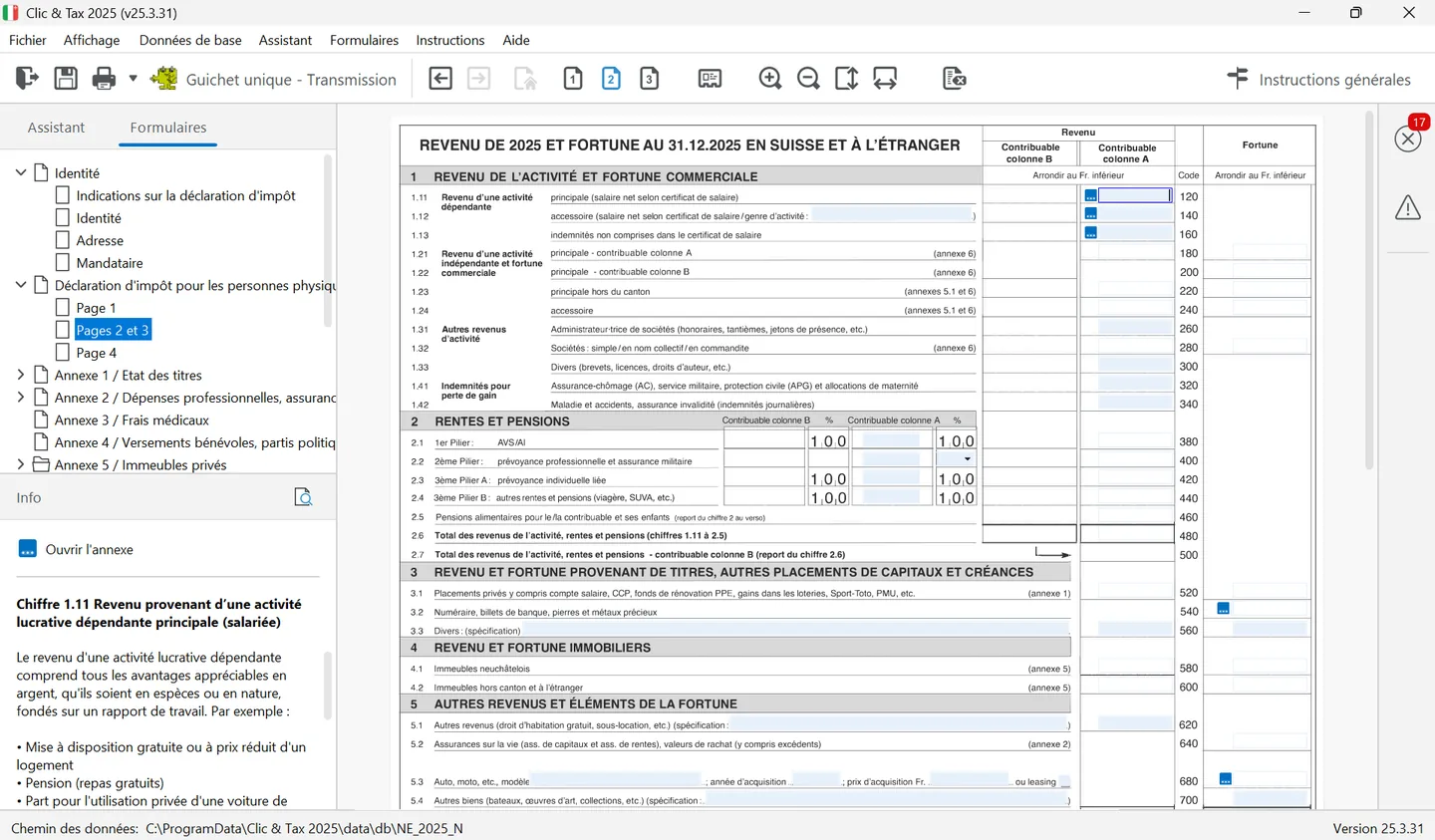
- Enter in item 1.11 the net salary from box 11 of each main salary certificate; secondary employment goes in item 1.12.
- Family allowances and tips not on the certificate go in item 1.13; unemployment, loss-of-earnings (APG) and maternity allowances in 1.41; sickness, accident or disability daily allowances in 1.42.
- AHV and disability pensions go in item 2.1, pension fund pensions in 2.2 (normally 100% taxable), pillar 3a pensions in 2.3 and others in 2.4.
- AHV/disability supplementary benefits, the helplessness allowance and maintenance received for an adult child are not taxable.
Main salary: item 1.11
Your employer must give you a salary certificate summarising everything paid. The amount for item 1.11 is box 11 of the certificate, the net salary after social security and pension contributions. It also includes benefits in kind: free or cheap housing, free meals, the private share of a company car. With several employers during the year, add the certificates together. Amounts are entered rounded down to the franc, without points, apostrophes or commas.
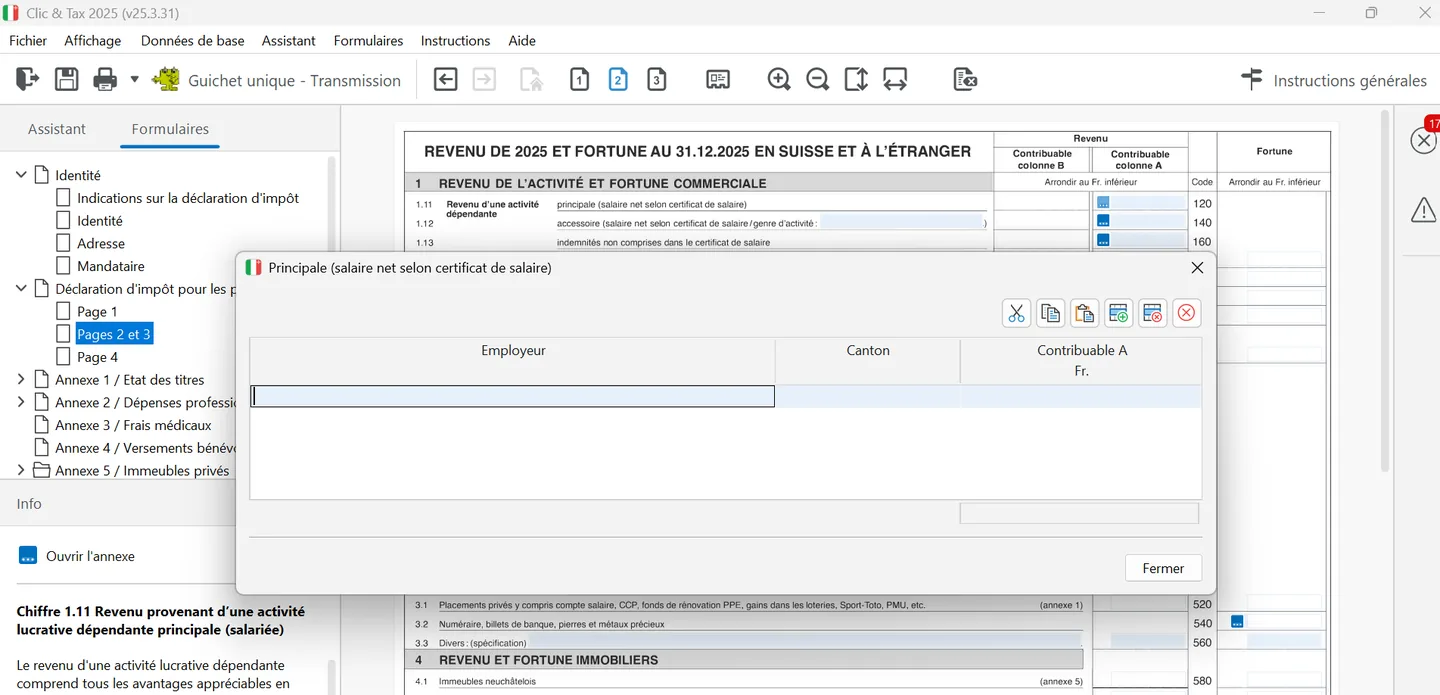
In Clic&Tax, open « Pages 2 et 3 ». Note: on these pages, the column for taxpayer B (spouse) is to the left of taxpayer A's, the Code column is in the middle and wealth is on the right. The small blue « ... » button next to item 1.11 opens a table to enter each employer (« Employeur »), its canton and the net salary; Clic&Tax carries the total to item 1.11. Items 1.12 and 1.13 have the same table (type of activity, canton, amount). The « Info » panel shows the instructions for the selected item and an « Ouvrir l'annexe » (open annex) link.
| Income | Item | Note |
|---|---|---|
| Net salary from main employment | 1.11 | Box 11 of the salary certificate |
| Secondary employment | 1.12 | Public office allowances, teaching, evening classes, examining, caretaking, condominium management |
| Allowances not on the certificate | 1.13 | Family and birth allowances paid directly, tips, benefits in kind |
| Self-employment | 1.21 to 1.24 | Annex 6 and accounts to attach (« NOTICE 3 ») |
| Director's fees | 1.31 | Bonuses, attendance fees, fixed allowances |
| Patents, licences, royalties | 1.33 | |
| Unemployment, military or civilian service, civil protection, maternity | 1.41 | Only if not already on a salary certificate |
| Sickness, accident, disability daily allowances | 1.42 | Paid by an insurer, disability insurance or military insurance |
Income from platform activities (selling goods, renting out property, services, content published online) is taxable according to the type of activity and how it is classified for tax: depending on the case, self-employment (items 1.21 to 1.24, annex 6) or other income, such as subletting in item 5.1. The tax service explains these cases under « Économie des plateformes » (platform economy) on its website.
Self-employment: annex 6
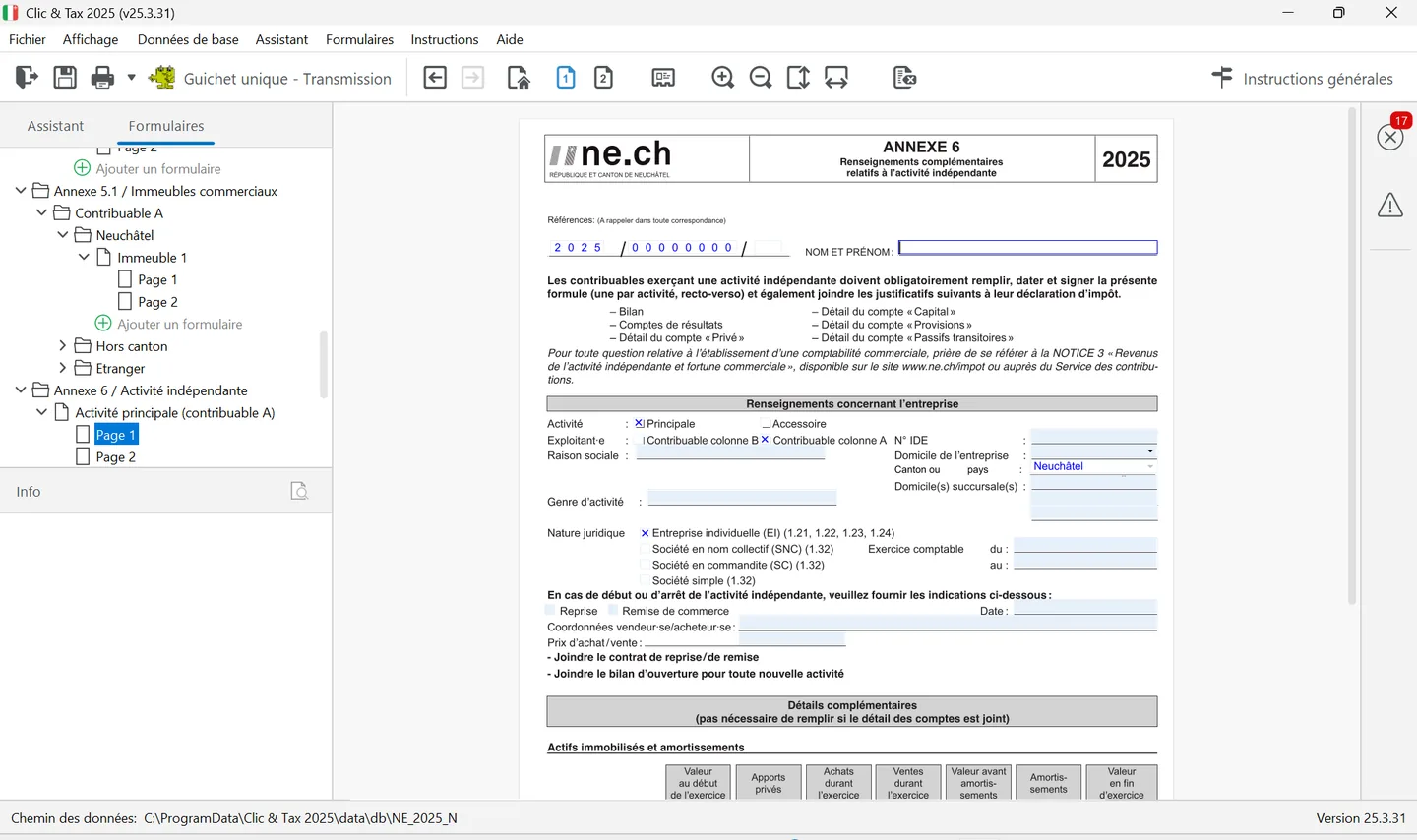
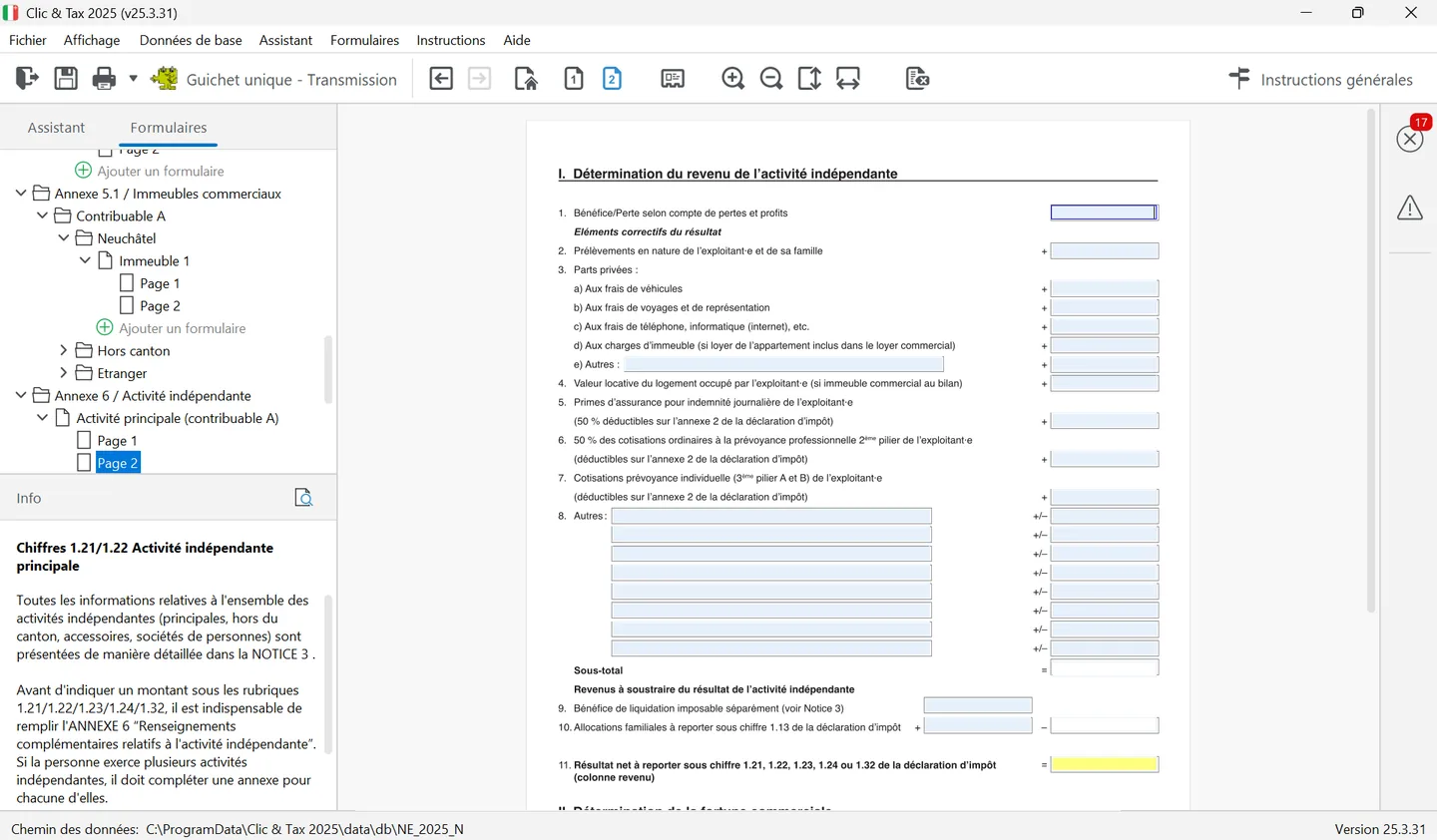
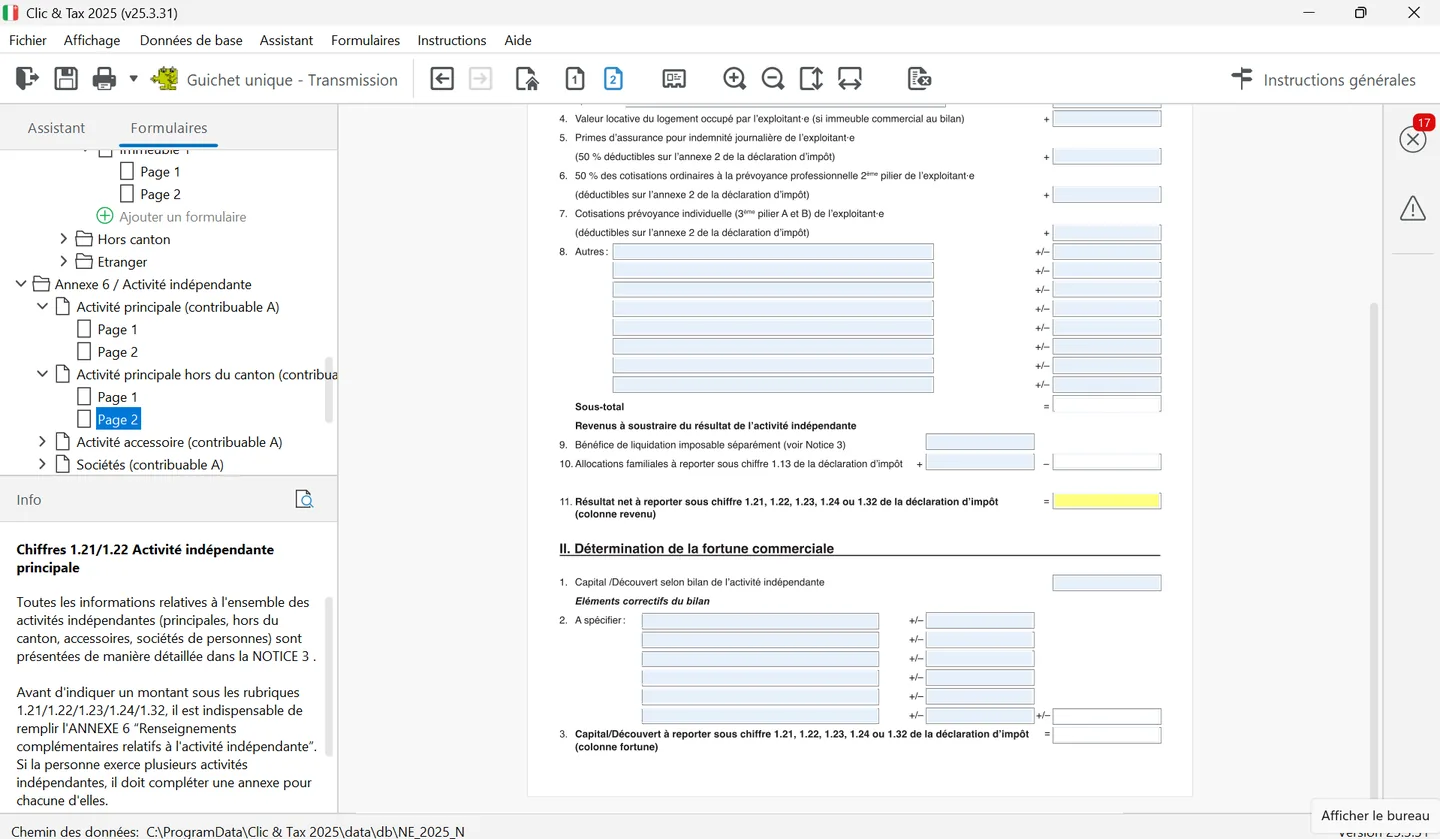
If you are self-employed, annex 6 is mandatory: one per activity, filled in, dated and signed. Attach the balance sheet, the income statement and the detail of the « Privé », « Capital », « Provisions » and « Passifs transitoires » accounts; the tax office's « NOTICE 3 » sets out the rules. In the tree, annex 6 comes as « Activité principale (contribuable A) », « Activité principale hors du canton », « Activité accessoire » and « Sociétés ».
Page 1 collects the details: main or secondary activity, operator (taxpayer A or B), UID number, business name, business address, type of activity, legal form (a sole proprietorship goes to items 1.21 to 1.24, a general or limited partnership or simple partnership to item 1.32), financial year and any takeover or transfer of the business. The « Détails complémentaires » box (fixed assets and depreciation, business vehicles used privately, flat rates booked) is optional if you attach the detail of your accounts. As the Info panel points out, annex 6 must be filled in before you enter an amount at items 1.21 to 1.24 or 1.32.
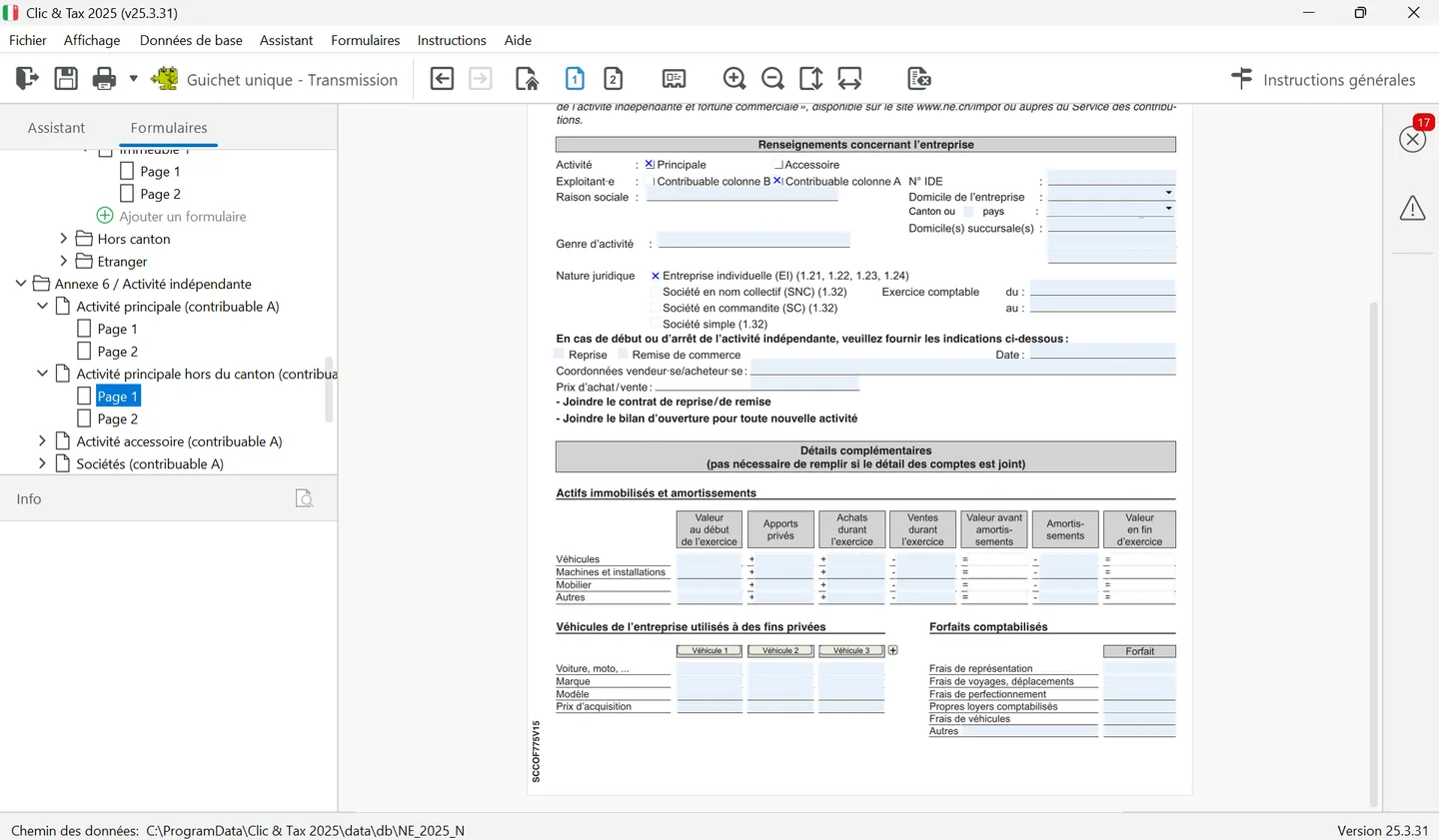
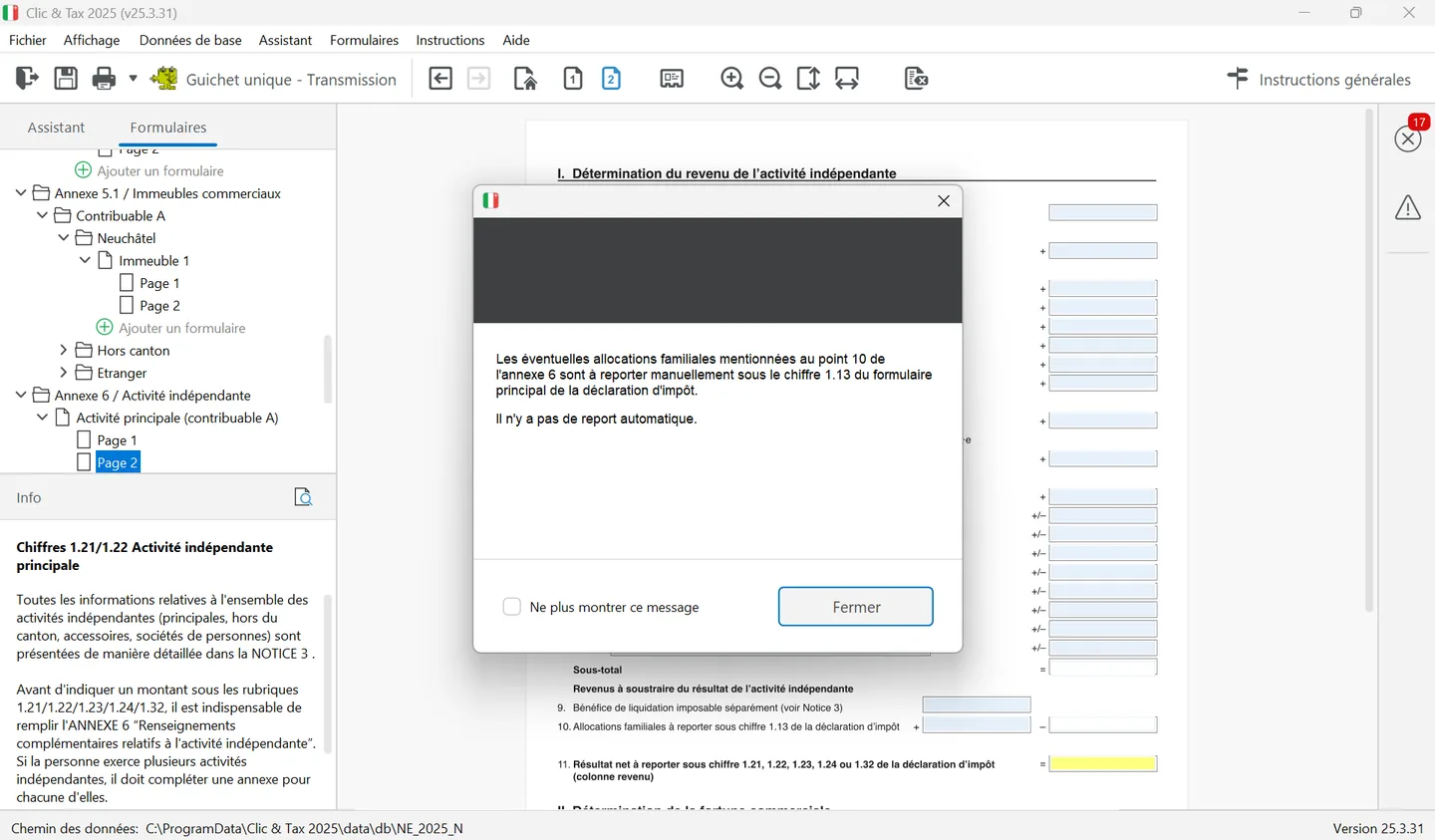
Page 2 determines the income. Start from the profit or loss in the income statement, then add the adjustments: withdrawals in kind, private shares of expenses (vehicle, phone, premises), rental value of private premises, private daily-allowance insurance premiums, and half of the LPP contributions and the 3a or 3b contributions booked as expenses, which are deducted on annex 2. The net result at point 11 is carried to item 1.21, 1.22, 1.23, 1.24 or 1.32. Part II determines the business assets: capital or deficit per the balance sheet, adjusted where needed, carried to the same items in the wealth column.
Pensions: items 2.1 to 2.5
| Pension | Item | Taxable share |
|---|---|---|
| AHV and disability, including supplementary pensions for the spouse and children | 2.1 | 100% |
| Pension fund (pillar 2), AHV bridging pension, military insurance | 2.2 | 100%; 60% or 80% for some pensions that started before 1987 or 2002 |
| Pillar 3a | 2.3 | 100% |
| Other pensions (SUVA, third-party liability, life annuities) | 2.4 | Life annuities: only the income portion |
| Maintenance received for yourself and your minor children | 2.5 | 100%, including family allowances paid by the ex-spouse |
- Not taxable: AHV/disability supplementary benefits, the disability and SUVA helplessness allowance, military insurance pensions that started before 1994, maintenance received for an adult child.
- Pension for a child: the supplementary pension of a retired or disabled parent is declared by the parent, an orphan's pension or a disabled child's pension by the child.
- Maintenance payments: in Clic&Tax, enter them in question 2 of the additional information (Page 4), with the payer's name and address; the amount is carried to item 2.5.
- « % » column: for each pension it shows the taxable share, 100 by default. For pillar 2 (item 2.2), choose the rate from the list.
- Lump sums from a pension fund or pillar 3: they are not pensions. They are taxed separately (see the Retirement savings chapter).
Clic&Tax then adds up employment income, pensions and maintenance in item 2.6 (and 2.7 for column B). Once your income is entered, move on to work expenses, which are deducted from your salary.
Frequently asked questions
Which salary certificate amount goes into Clic&Tax?
The net salary in box 11 of the certificate, in item 1.11 for main employment or 1.12 for secondary employment. With several employers, add the certificates together.
Where do I declare unemployment benefits in Neuchâtel?
In item 1.41, together with loss-of-earnings allowances (military service, civil protection) and maternity allowance, if they are not already on a salary certificate.
Are family allowances taxable in the canton of Neuchâtel?
Yes. If they are not on your salary certificate, declare them in item 1.13. Family allowances received from abroad are also taxable at your place of residence.
Are AHV supplementary benefits taxable?
No. Supplementary benefits to the AHV and disability pensions, and the helplessness allowance, are not taxable and are not declared.
Rather hand it over?
NeoFidu prepares and files your Neuchâtel tax return for you, including property, securities and subsequent ordinary assessment (TOU) cases, with a check for missed deductions. Service in English available.
This guide is for information only and is not personalised advice. Amounts come from the 2025 general instructions (« Instructions générales ») of the Neuchâtel cantonal tax service (Service des contributions), the overview of deductions for 2026 published in its 2026 interim instructions, its leaflets (« notices ») and the Swiss Federal Tax Administration's Neuchâtel cantonal sheet (February 2026). Clic&Tax is not available in English: we quote the French labels, followed by a translation, so you can find them on screen. If in doubt, the tax service's general instructions prevail.